Schedule Settings Panel
The Schedule Settings panel is used to define settings for automatically sending leads for upcoming service appointments to FOCUS in the Digital Retail Platform.

|
The Schedule Settings panel displays on the General Settings screen. To access the General Settings screen, click the |
 (More) icon and then click the General Settings link in the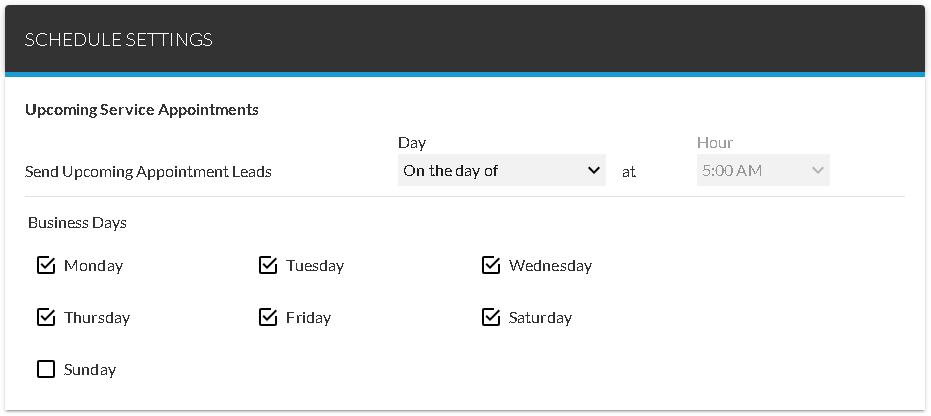
 Upcoming Service Appointments Section
The Upcoming Service Appointments section is used to define the number of days before service appointments that leads should be sent to FOCUS as well as the time at which the leads should be sent. In addition, this section is used to determine on which days of the week to automatically send leads for scheduled appointments.
The following items are available in the Upcoming Service Appointments section.
Day: Select the number of business days prior to upcoming service appointments to automatically send leads for appointments to FOCUS. Click the  (Down Arrow) icon to display a list of valid entries.
Note - When On the day of is entered in the Day field, the lead is created on the day that the appointment is scheduled.
Hour: Select the time of day to automatically send leads for upcoming service appointments. Click the (Down Arrow) icon to display a list of valid entries.
Note - Leads can only be sent between 5:00 a.m. and 8:00 p.m. Eastern time. When On the day of is entered in the Day field, 5:00 AM is automatically entered in the Hour field and cannot be changed.
Business Days: Select check boxes corresponding to the days on which leads for upcoming appointments should be sent.
Click here for a list of products that may be mentioned in this help file.